
Tensorfuse runs application infrastructure in your AWS account. Initial setup connects that account, grants the required permissions, and configures the cluster before an application is deployed. Cluster setup and an individual application’s deployment configuration are separate steps.
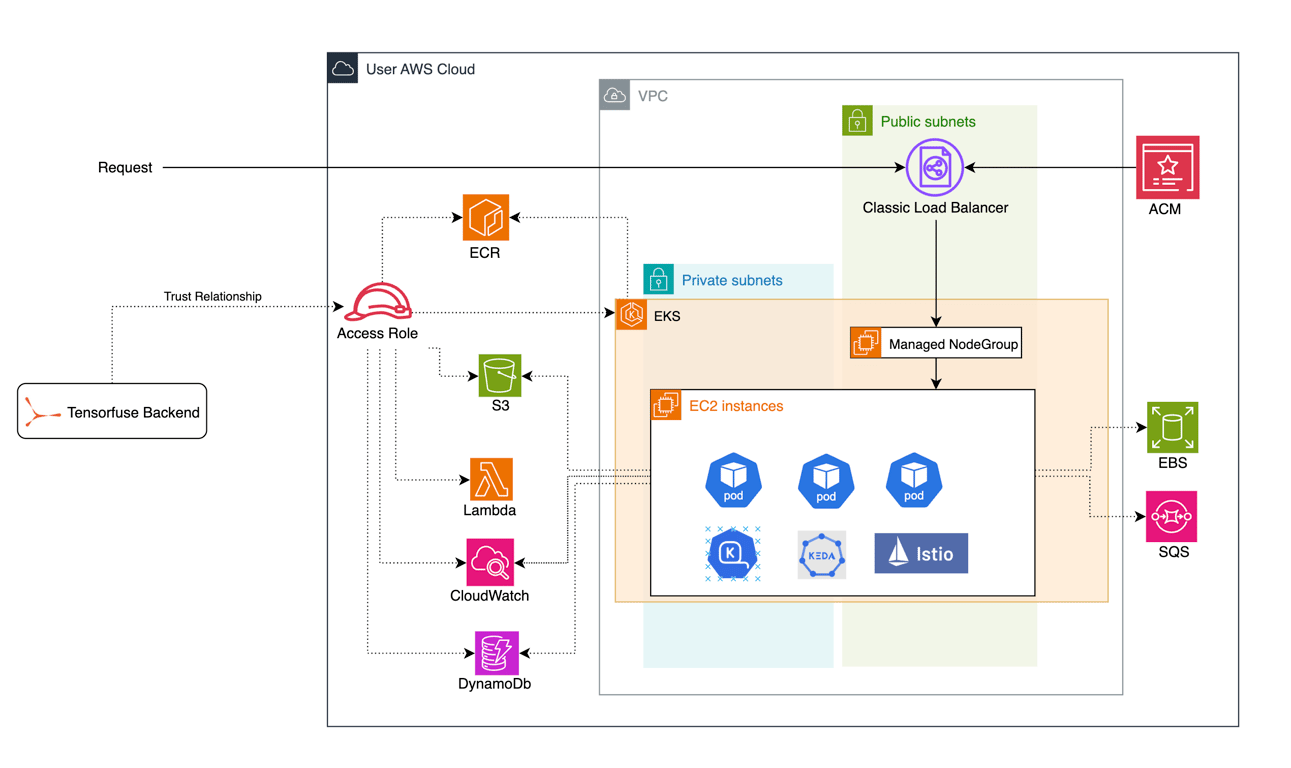
Setup sequence

Follow getting started to connect AWS and configure local CLI access. Review the account connection permissions and configure permissions before creating the required resources. After cluster setup, the application’s Dockerfile defines its software environment. Its deployment configuration selects runtime resources, scaling settings, secrets, and readiness checks. These application settings belong in version control with the application where appropriate; secret values belong in secrets.

Costs and access

Scaling application replicas to zero does not mean every AWS resource in the cluster disappears. Account for retained cluster and supporting infrastructure when evaluating deployment cost. Grant additional team members access through the documented member setup, then use the configuration reference for application settings.
Tensorfuse configure architecture diagram